
“Subscribe to our newsletter” convinces almost nobody. It’s the marketing equivalent of a form letter — technically an offer, but not one that tells the visitor what’s actually in it for them.
A personalized popup does the opposite: it reacts to what a specific visitor is doing, reading, or has already bought, and offers something that actually matches. This guide covers what that looks like in practice, how much of a difference it really makes, and how to set it up.
One note before diving in: the setup steps below are specific to Icegram Engage, Icegram’s on-site popup tool — not a generic popup tutorial.
What makes a popup “personalized”?
A personalized popup is one that changes its message, offer, or timing based on real signals about the specific visitor seeing it — their behavior on the page, which page they’re on, or where they came from — instead of showing the identical message to everyone who lands on your site.
A generic popup asks the same “Join our newsletter” question of a first-time visitor and a returning customer. A personalized one might offer a first-time visitor a beginner’s guide, and a returning customer an update on something they’ve already shown interest in.
Why personalized popups convert better
The numbers back this up. Personalized, behavior-triggered popups can improve conversions by 20–40% compared to generic ones, and popup campaigns using custom audience targeting have hit conversion rates well above the 2026 industry average of roughly 4.8%.
The mechanism is simple: relevance lowers resistance. A visitor is far more likely to give up their email address for something that clearly applies to them than for a generic invitation to “stay updated.”
One caution worth naming directly: popups that take over a visitor’s screen on mobile, before they’ve had a chance to engage with the page, can trigger Google’s intrusive interstitial penalty and hurt your rankings. Personalization only helps if the popup itself is well-timed and unobtrusive.
How to build a popup that actually converts?
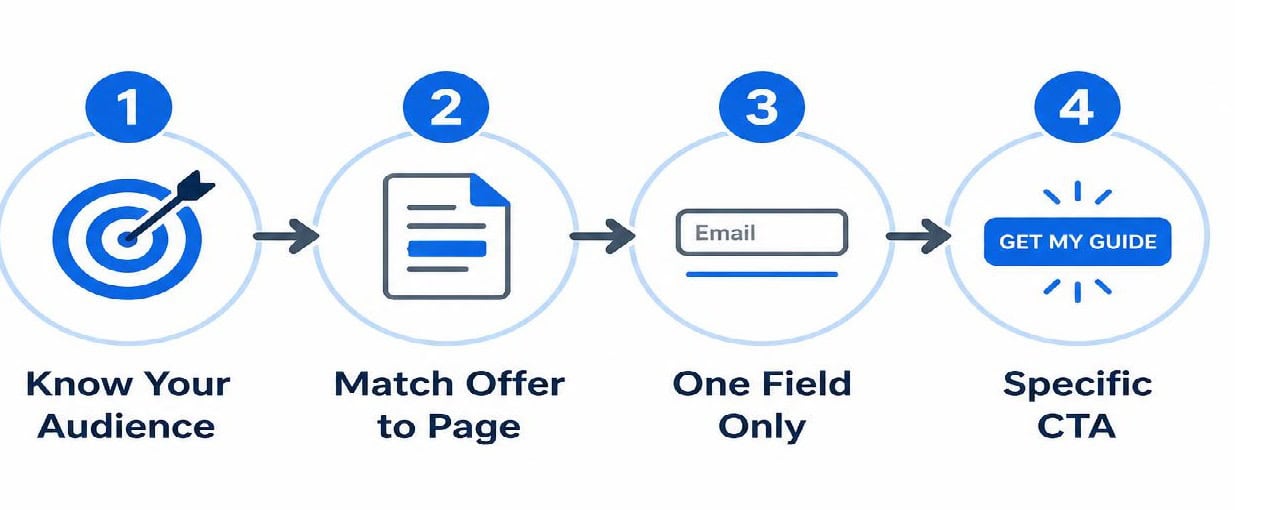
Know your target audience: Understand who you’re targeting before creating your offer. A useful checklist, template, or short guide connected to the exact content someone is reading will outperform a generic “join our list” message because it provides clear value in exchange for an email.
Match the offer to the page: Create popups based on the visitor’s current interest, not just who they are. A visitor reading about a specific problem is more likely to convert when the popup offers a solution related to that topic.
Keep the form simple: Use a single email field to reduce friction. Collect additional details like names or preferences later through a welcome email or thank-you page.
Use a specific call to action: Replace generic buttons like “Subscribe” with action-focused CTAs that highlight the benefit, such as “Get the checklist” or “Download the guide,” to encourage more conversions.
Types of Triggers
Timing changes who sees your popup, and how receptive they are when they do.
Time-delay or scroll-triggered popups, shown after a visitor has read a meaningful portion of the page, consistently outperform popups that appear the instant someone lands — asking too early feels like asking a stranger for their number before introducing yourself.
Exit-intent popups, triggered when a visitor’s cursor moves toward closing the tab, catch people at the last possible moment and convert well above the general average.
Click-triggered popups — shown only after a visitor clicks something first — tend to convert higher still, since that extra click is itself a signal of real intent.
Icegram Engage supports targeting by page, visitor behavior, referral source, and more, so these triggers aren’t something you’re stitching together manually — they’re built into how a campaign is configured.
What happens after someone subscribes?
Getting the subscription is the beginning, not the finish line. What happens in the following days is what decides whether that subscriber stays engaged or quietly unsubscribes a month later.
This is where Icegram Express takes over from Engage — automated welcome sequences, follow-up campaigns triggered by what someone signed up for, and ongoing nurture emails that keep the relationship going without manual work on your end.
Getting started
A personalized popup doesn’t need to be complicated to outperform a generic one — matching the offer to the page and the visitor is most of the work. Icegram Engage handles the popup and targeting side of this; pairing it with Icegram Express covers what happens after someone says yes.
FAQ
What’s a good popup conversion rate?
Industry averages sit around 4–5% for standard popups, with well-targeted, personalized campaigns reaching well into double digits.
Do personalized popups actually outperform generic ones, or is that just marketing talk? Large-scale popup data backs it up — personalization and behavior-based targeting are consistently associated with meaningfully higher conversion rates than static, one-size-fits-all popups.
Will popups hurt my SEO?
Only if they’re intrusive on mobile — a full-screen popup that blocks content immediately can trigger Google’s interstitial penalty. Delayed, scroll-triggered, or exit-intent popups avoid this.
What should happen right after someone subscribes?
An immediate, automated welcome email, followed by a short nurture sequence relevant to what they signed up for — this is typically handled by your email automation tool, separate from the popup tool that captured the subscription.