
Morning.
Your promotional email lands perfectly.
A customer opens it, clicks through, and places an order.
Everything works.
Evening.
The same customer checks their inbox again—this time for the order confirmation.
Refresh. Nothing.
Same inbox. Same customer.
Two completely different experiences.
One email drives revenue.
The other protects trust.
And here’s the catch—most WordPress store owners optimize for the first…while assuming the second just works.
It doesn’t.
In this guide, we’ll break down the real difference between transactional and marketing email delivery in WordPress, why one often fails silently, and how to fix it before it starts costing you customers.
What are transaction and marketing emails?
Transactional and marketing emails are worlds apart in terms of the purpose they serve.
Especially when you’re running a WordPress site, decisions happen fast, and confusion usually stems from not having a clear comparison.
Let’s check out the key differences in transactional and marketing emails.
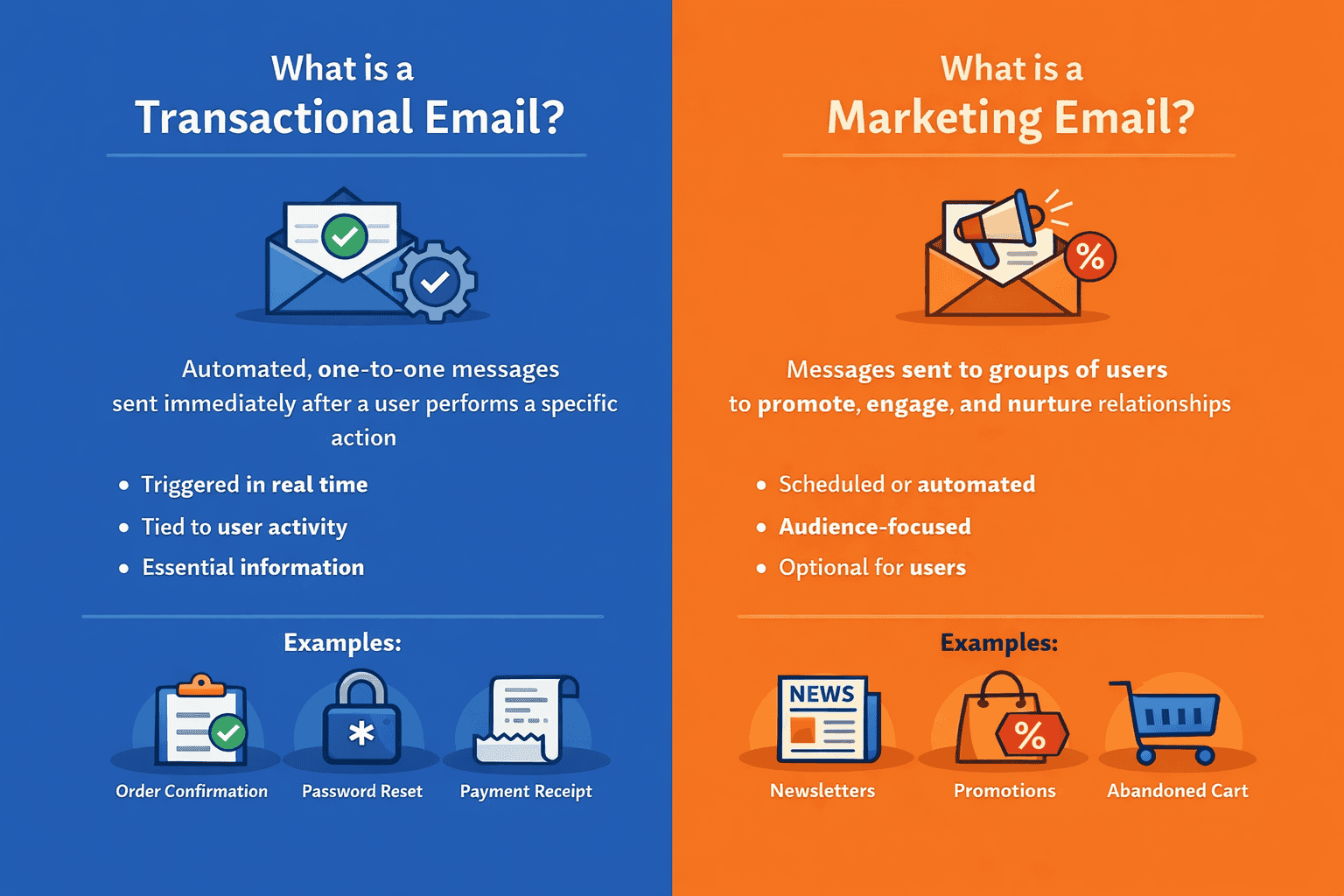
By now, the distinction may seem clear in theory.
Let’s move on to how these emails affect each other – specifically!
How does marketing email affect transactional emails?
A lot could go unnoticed if you miss the nitty-gritty. Check out how marketing emails can overshadow transactional emails:
Deliverability issues
Your critical emails, like order confirmations or password resets, start landing in spam or getting delayed.
Why?
Because bulk campaigns sent without a reliable third-party sender can damage your sender reputation, affecting every email you send. This can be due to poor list hygiene, spammy content, and similar aspects.
To avoid this, you must address spam complaints and check the spam score before sending emails, while also keeping a check on bounce rates.
Tools like Icegram Express prevent such issues by giving you a complete spam report before sending, so you can be sure of your emails before hitting send. The tool also helps you monitor the sender’s reputation and delivery performance regularly so you can steer clear of these issues effectively.
Compliance risks
Marketing emails require consent, unsubscribe options, and proper handling of user preferences. While transactional emails also require the above factors, mixing both can make things problematic.
For example, to unsubscribe from marketing emails, you must click on ‘unsubscribe from all,’ which might get your email address unsubscribed from transactional emails too.
An excellent solution:
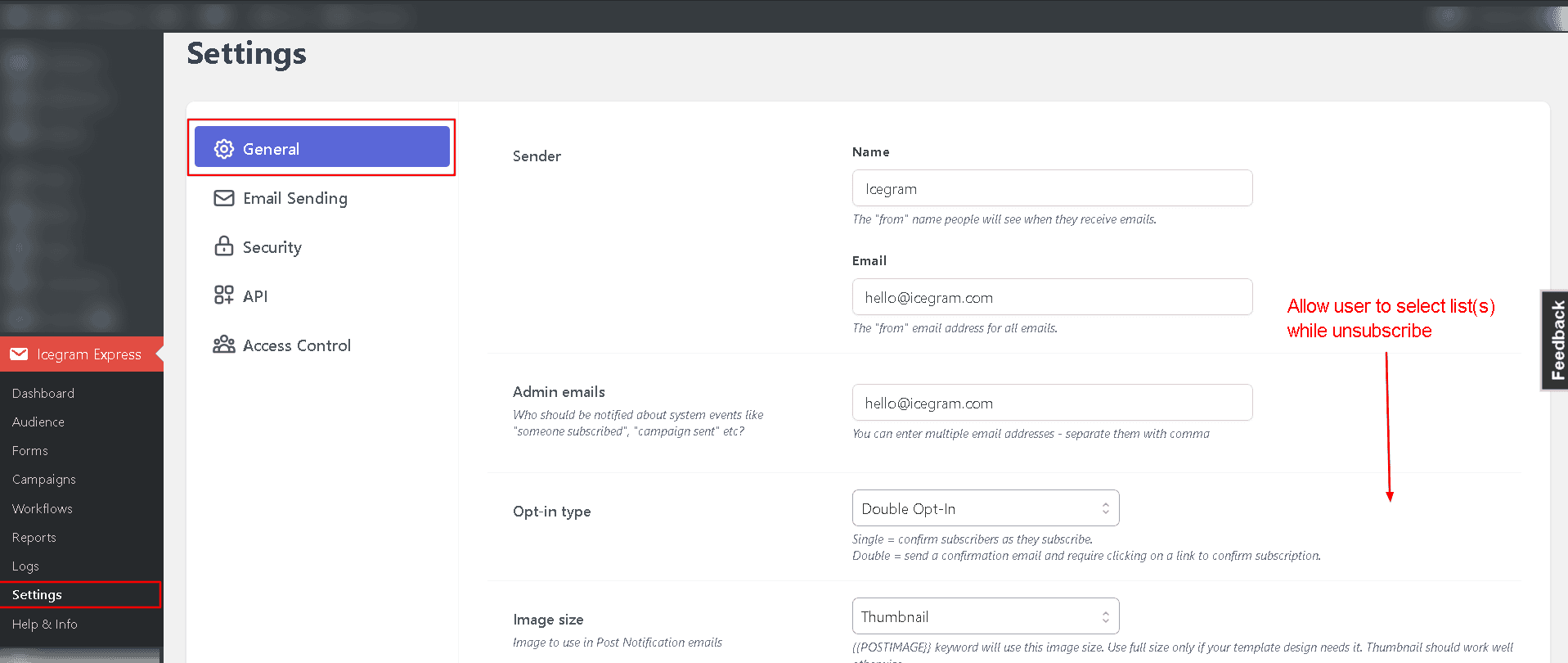
Icegram Express lets you customize the page where they can select from which list they want to opt out
Here’s how it looks on the Icegram Express dashboard:
Transactional email landing in spam
Transactional emails should be instant, but when they share the same system as marketing emails, they can end up in spam.
Why?
A shared sender reputation. Poor-performing campaigns or spammy content can hurt your email sending, affecting all emails.
Result?
Missed confirmations, delayed resets, and a broken customer experience.
What should you do then?
Protect transactional and marketing emails such that they consistently land in the inbox, rather than in the spam folder.
One of the excellent solutions can be using a dedicated delivery tool such as Icegram Mailer.
Now, let’s move on to how these emails affect each other – the other way round.
How do transactional emails affect marketing emails?
Transactional emails can overshadow marketing emails, too.
Here’s how.
Sending limits
Even though transactional emails could be low in volume, they still impact a free-flowing communication with your audience.
Transactional emails can consume a chunk of your sending limits. If not managed properly, they can:
- Reduce the bandwidth available for campaigns.
- Create sending conflicts during high activity periods.
This can be explained with the help of the following example:
If you have a monthly quota of 10,000 emails. And if you have already sent 9,000 marketing emails, then your 1,000 per day transactional email limit can be affected.
Your 1,000 transactional emails can only be sent for a day and will stop the next day.
Preventive measures
Check for your daily and monthly email quota to ensure that the tool aligns with your requirements.
- Monitor sending limits and performance regularly.
- Keeping transactional emails isolated ensures your marketing campaigns run smoothly without unexpected restrictions.
Having said all of the above, a plethora of problems can creep up when sending out marketing or transactional emails without the right tools.
Check out Icegram Mailer to solve your email sending woes.
A quick recap: Transactional emails vs marketing emails
Here’s a side-by-side breakdown that simplifies everything:
| Factor | Transactional emails | Marketing emails |
|---|---|---|
| Trigger | Sent instantly after a specific user action. | Sent based on schedule, automation, or campaign logic. |
| Purpose | Facilitate a user action or complete a process. | Drive engagement, retention, and sales |
| Audience Type | Individual user (one-to-one) | Groups or segments of users (one-to-many) |
| Volume | Low to moderate, depends on user activity | High volume, often sent in bulk |
| Compliance Requirements | Generally exempt from opt-in rules (must be service-related) | Require explicit consent, unsubscribe options, and preference management |
| Deliverability Expectations | Must reach inbox immediately and reliably | Must maintain sender reputation over time to avoid spam filters |
Conclusion
If there’s one thing to take away from this guide, it’s this:
Transactional emails and marketing emails serve completely different purposes. However, ensuring that they reach the audience’s inbox is yet another story.
While Icegram Express manages email creation, automation, and audience engagement, Icegram Mailer ensures delivering those emails reliably and consistently without any roadblocks.
Together, they create a system where each part does its job without interfering with the other.
We agree, there could be a lot more than what meets the eye! Especially when you are in the pursuit of going above and beyond!
If you’ve had any similar experiences, contrary opinions, or any golden nuggets of advice you’d like to add, drop a line in the comments below – we’d love to chat!
In the meantime, if you wish to try out something worth your time, check out Icegram Mailer!
FAQ
Do I have to set up SPF, DKIM, etc., on my one to reduce spam complaints?
Yes, SPF, DKIM, and DMARC need to be properly configured on your domain to improve deliverability and reduce spam.
You don’t always have to do it manually; tools like Icegram Mailer can guide or handle most of the setup.
Can an email be both transactional and marketing at the same time?
In some cases, yes, but with caution.
For example, an order confirmation email (transactional) may include a small product recommendation. However, the primary purpose must remain transactional. If the email becomes heavily promotional, it may be treated as a marketing email by inbox providers and fall under stricter compliance rules.
What is email throttling, and why does it matter?
Email throttling is when email providers limit the number of emails you can send within a specific time frame.
If you send too many emails too quickly, especially without proper infrastructure, your emails may be delayed or blocked. This is particularly problematic if transactional emails share the same pipeline.
How often should I clean my email list?
Regular list hygiene is essential for marketing emails.
You should:
- Remove inactive subscribers
- Clean invalid or bounced emails
- Re-engage dormant users before removing them
This helps maintain a good sender reputation and higher engagement rates.