

How to Embed Icegram Express Forms on External Websites
MaxEmbed Icegram Express subscription forms on external sites, landing pages, or third-party web platforms using HTML code.
With Icegram Express Max, you can generate embeddable HTML forms that work on external websites, static HTML landing pages, subdomains, or third-party CMS platforms. Contacts submitted through these external forms sync directly into your WordPress Icegram Express subscriber database.
How to Generate and Embed the External Form Code
-
In your WordPress admin, go to Icegram Express > Forms.
-
Click Edit on the form you want to deploy externally (or click Add New).
-
Under the form options, locate and toggle on Enable embed form.
-
Whitelist the external domains or website URLs where this form will be embedded to authorize cross-origin submissions.
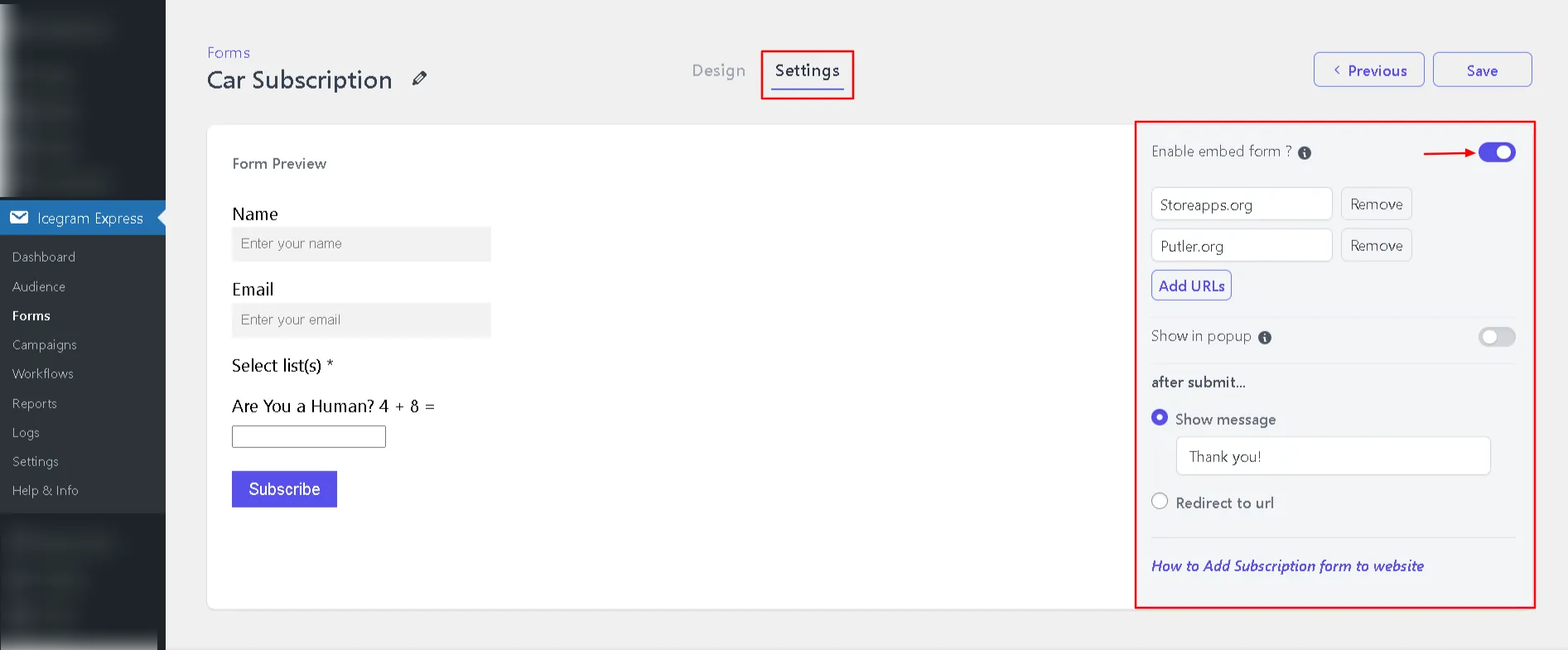
Configure allowed external domains for embeddable subscription form -
Click Save Changes.
-
Back on the Forms list screen, hover over the form and click Get Embed Code.
-
Copy the generated HTML snippet.
-
Paste the code into your external site’s HTML markup or CMS block editor (such as an HTML Custom Block).
Whenever a visitor signs up on the remote page, their data will securely route back to your WordPress database and be cataloged under your chosen subscriber list.