Custom Success Messages and Redirection in Icegram Express
Redirect subscribers to a custom thank-you page or display custom success messages after form submission using Icegram Express for WordPress.
Guiding subscribers to a dedicated confirmation or thank-you page immediately after they sign up improves conversion rates and sets expectations for what happens next.
Icegram Express gives you two options following form submission:
- Displaying a customized in-place success notification.
- Redirecting the user automatically to a specific URL (such as a thank-you page, freebie download, or onboarding guide).
How to Configure After-Submit Actions
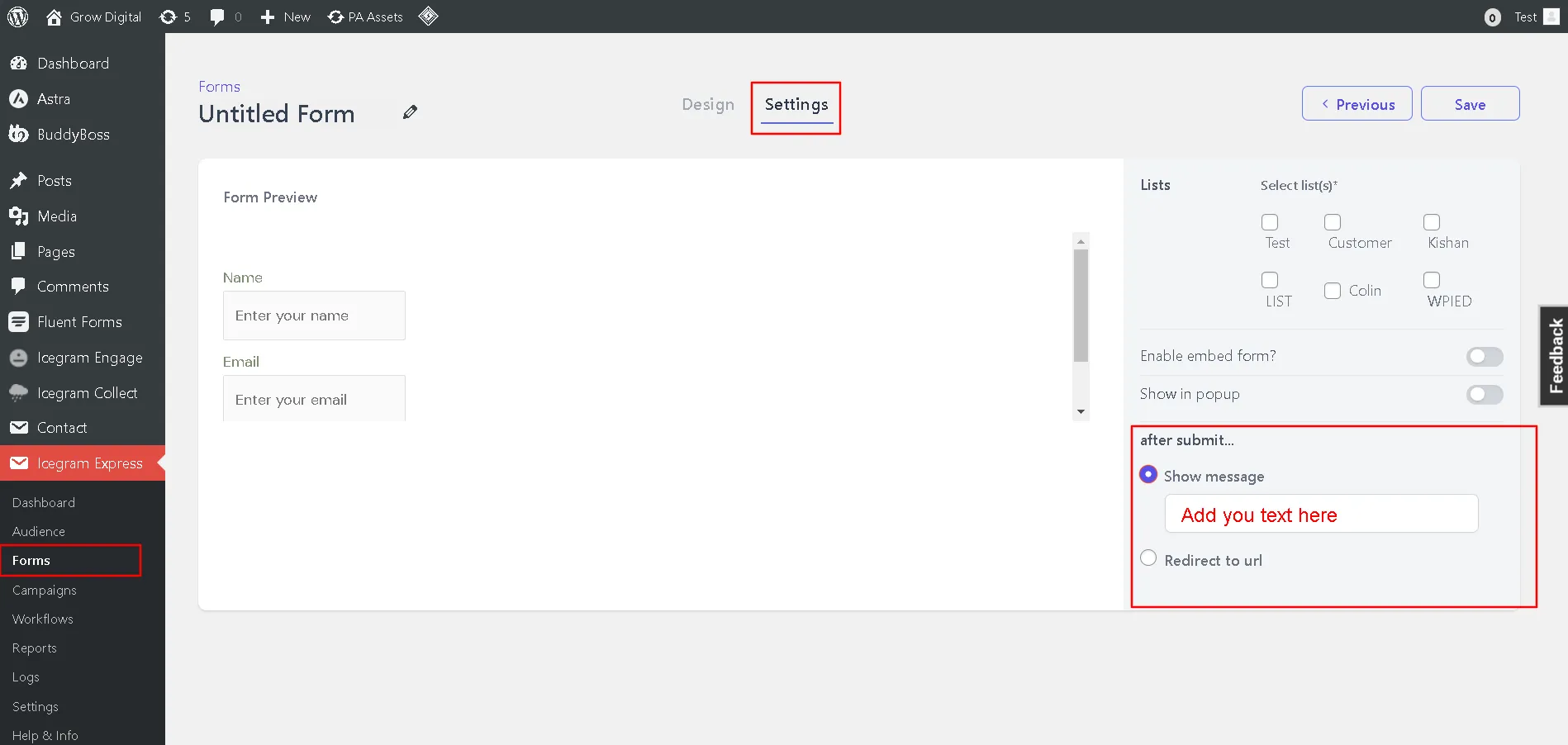
- In your WordPress admin, go to Icegram Express > Forms.
- Edit an existing form or click Add New.
- In the right-hand settings sidebar, scroll to the After Submit section.
- Choose your desired action:
- Show Message: Enter a custom message (e.g., “Thank you for joining! Check your inbox to confirm your subscription.”).
- Redirect to URL: Enter the full destination link (e.g.,
https://example.com/thank-you/).
- Click Save Changes.