

Icegram Express Housekeeping Feature for Campaign Cleanup
MaxAutomatically prune completed, sent, or failed campaign reports, queues, and user action logs older than one year in Icegram Express Max.
Over time, high-volume email campaigns generate hundreds of thousands of queue items and engagement records. The Housekeeping feature in Icegram Express Max automatically purges historical campaign delivery data older than one year, preventing database bloat and keeping WordPress queries fast.
What the Housekeeping Worker Removes
When enabled, the automated background worker cleans records whose delivery finished more than one year ago:
- Delivery and Sending Queues: Purges all processed queue records (
SENTandFAILEDqueue entries) older than one year. - Engagement Logs: Clears associated open, click, and user action logs linked to those historical deliveries.
- Campaign Records: Deletes expired one-off Newsletter records. For recurring Post Notifications and Post Digests, the core campaign rule remains untouched, while historical delivery queues and action logs are pruned.
The cleanup runs automatically every week on Sundays at 12:00 AM UTC in the background.
How to Configure Housekeeping
- In your WordPress admin, go to Icegram Express > Settings.
- Select the General tab and scroll to the Housekeeping section.
- Toggle on Enable housekeeping.
- Choose which campaign types to include in the one-year retention cleanup:
- Post notification
- Post digest
- Newsletter
- Click Save Settings.
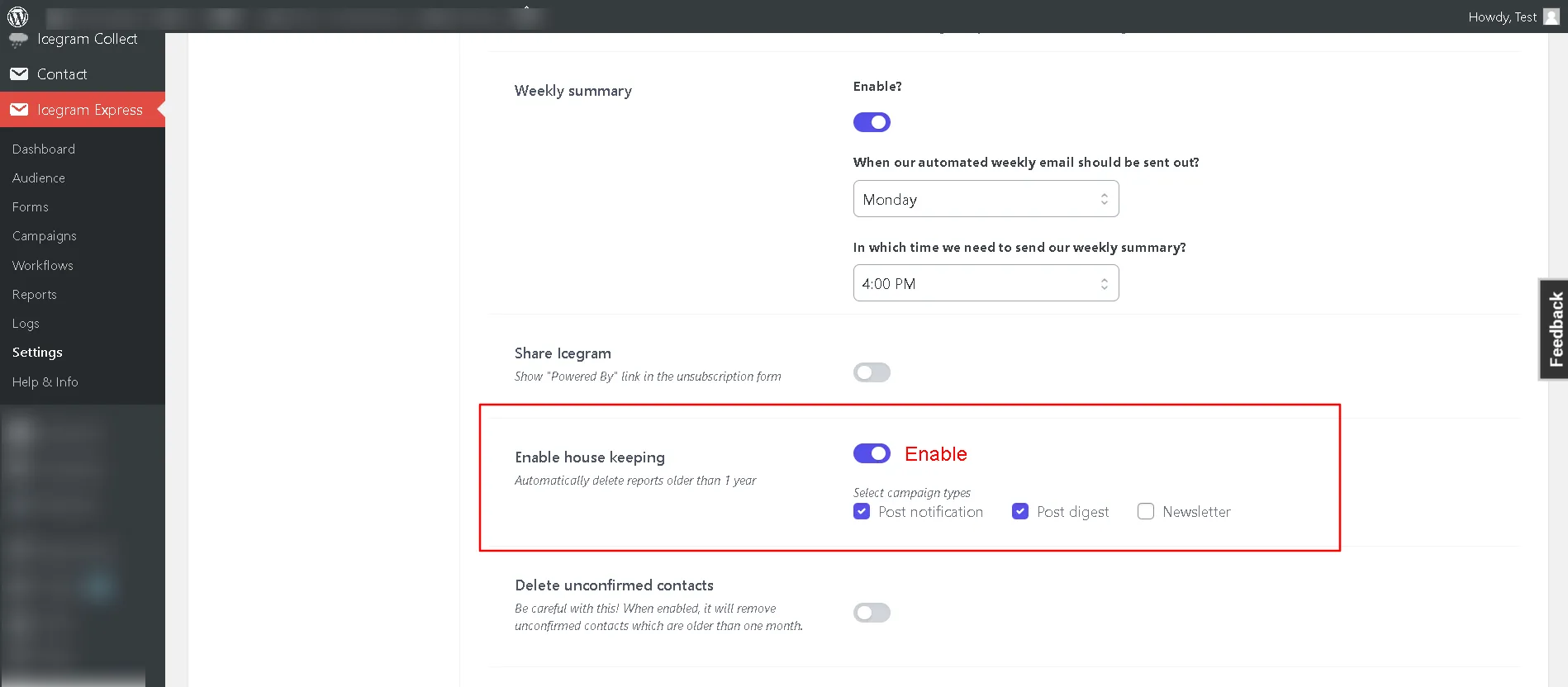 Note: Image illustrates configuration toggles; current interface styling reflects the modern admin theme.