

Add Surveys or Polls to Icegram Express Email Campaigns
MaxEmbed interactive 1-click survey and feedback rating blocks into emails using the Drag & Drop editor in Icegram Express Max.
Embedding interactive survey or poll blocks into your newsletter campaigns allows you to collect direct reader feedback, gauge satisfaction scores (NPS), and understand your audience’s interests with a single click.
How to Add a Survey Block to Your Email
- In your WordPress admin, go to Icegram Express > Campaigns and open or create a campaign using the Drag & Drop Editor.
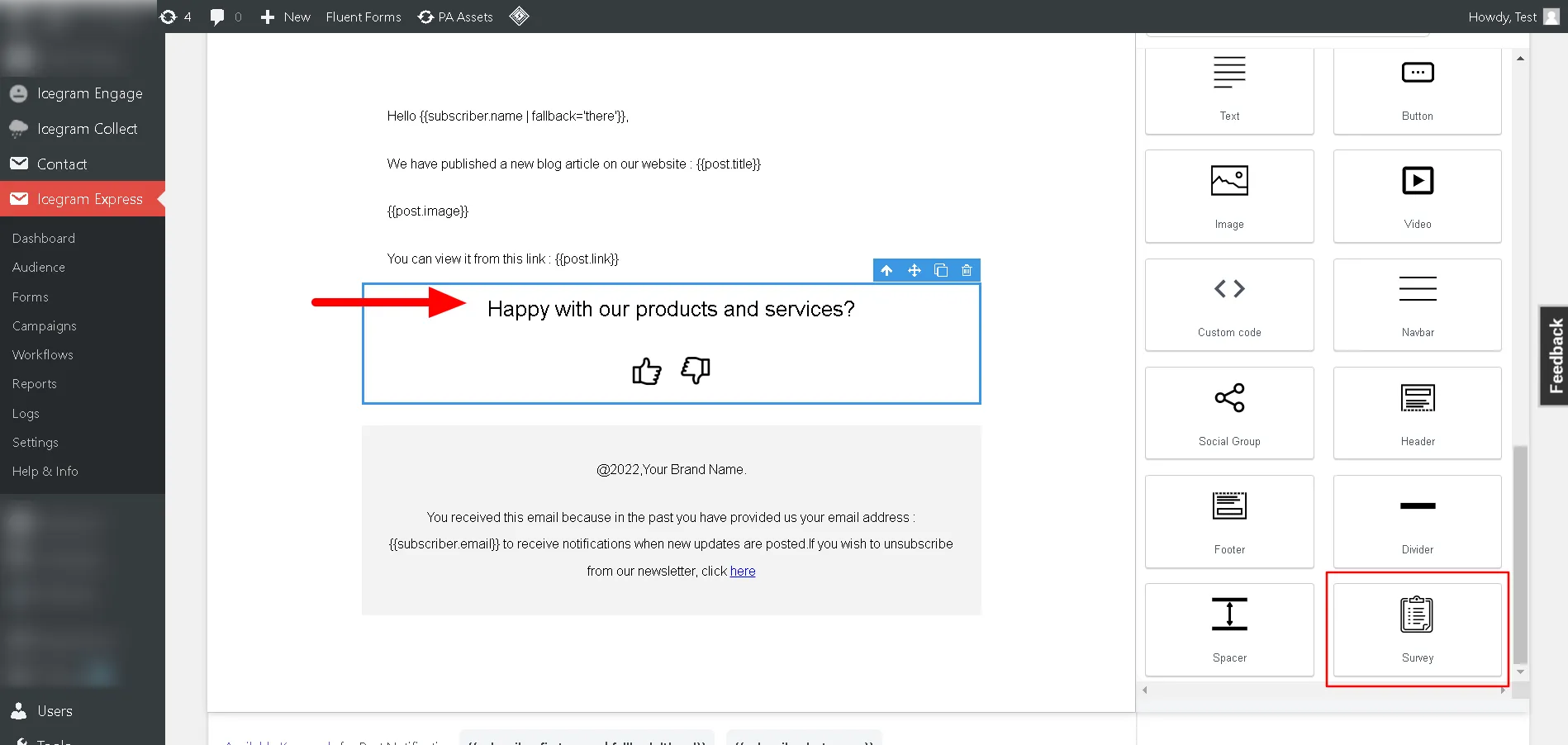
- In the right-hand Blocks palette, locate the Survey block.
- Drag and drop the survey block into your desired email layout position.
- Customize your question prompt (e.g., “How helpful was this article?” or “What topic should we cover next?”).
- Configure response options (e.g., Star ratings, Thumbs up/down, or 1–5 numerical scale).
- Preview and save your campaign.
Viewing Survey Results
To inspect incoming survey votes:
- Navigate to Icegram Express > Reports.
- Click View on the specific campaign report.
- The report dashboard displays aggregate poll counts and individual subscriber responses.