

Configure Post and Page Duplicate Settings
Configure clone options, title suffixes, default post status, and element copy preferences in Post and Page Duplicate settings.
Post and Page Duplicate by Icegram gives you granular control over exactly which data fields are copied when cloning content. You can choose to clone only layout and content while omitting publish dates, status, or author assignments.
How to Configure Duplication Preferences
-
In your WordPress dashboard, navigate to
Duplicate Posts & Pagesin the main admin sidebar. -
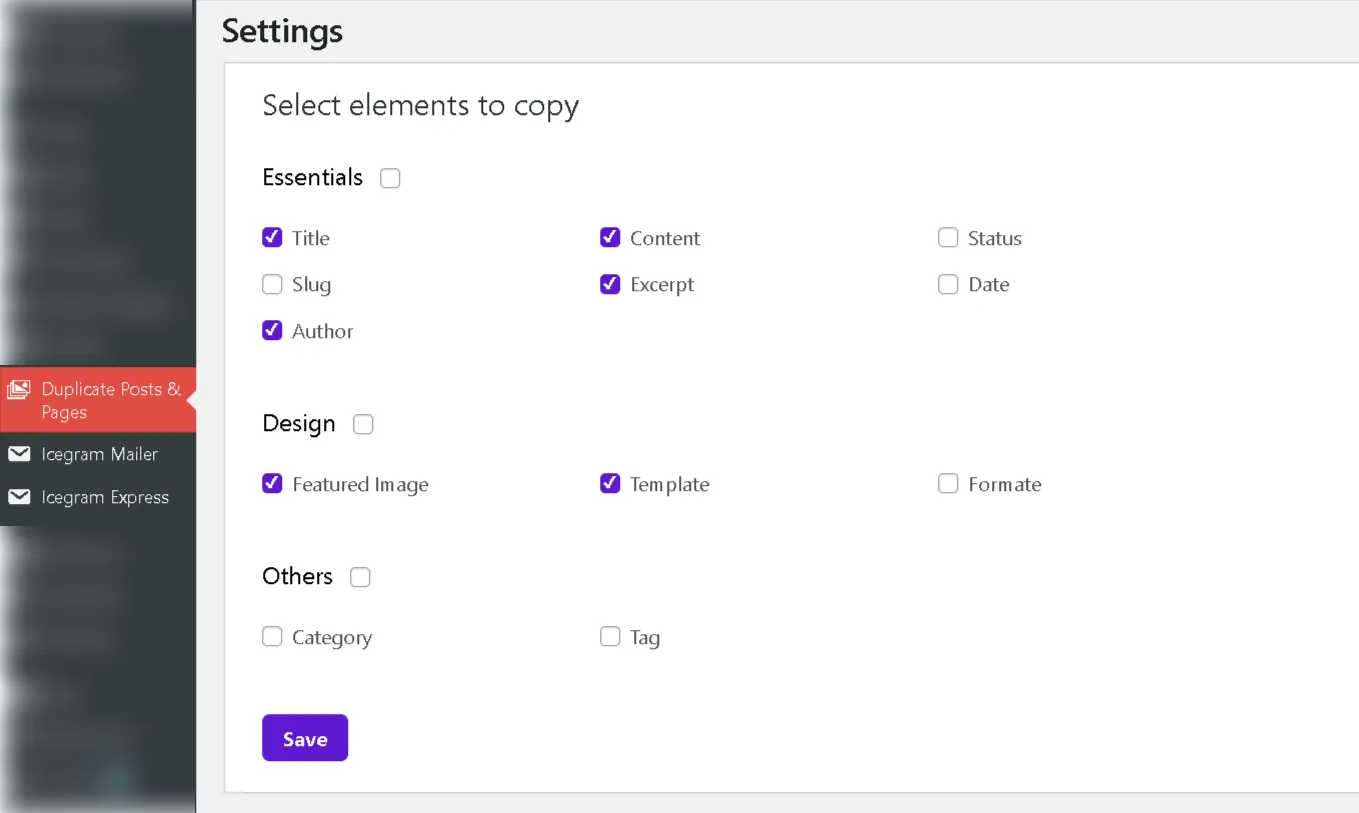
Review the list of available attributes organized into three sections:
- Essentials: Title, Content, Status, Slug, Excerpt, Date, and Author.
- Design: Featured Image, Template, and Format.
- Others: Category and Tag.
-
Check the specific elements you want carried over to duplicated posts. Use the section-level checkboxes to quickly select or deselect all attributes in a category.
-
Click Save to store your preferences.
Element Behavior and Defaults
- Title: When enabled, duplicated posts preserve the original title with
(copy)appended to distinguish the clone. - Status: When enabled, clones inherit the exact status of the parent item (e.g., Published, Private, Pending). When disabled, clones safely default to Draft.
- Date: When enabled, the original publication timestamp is preserved. When disabled, the clone receives the current date and time.
- Author: When enabled, the original author is retained. When disabled, the post author is assigned to the current user executing the duplication.
- Template & Design: Preserves custom page templates, post formats, and featured images so page builder layouts remain identical.