

How to Schedule Campaigns in Icegram Engage
Set start and end dates or advanced time schedules for flash sales, holiday banners, and promotional popups in Icegram Engage.
Scheduling allows you to automate marketing promotions in advance—such as Black Friday sales, weekend discounts, or seasonal registration deadlines—ensuring campaigns activate and expire precisely when needed.
Standard Date Scheduling (Free)
Basic date-range scheduling is included in the free core version of Icegram Engage.
-
In your WordPress dashboard, navigate to
Icegram Engage→Campaignsand edit or create a campaign. -
In the campaign settings panel, locate the When display rules section.
-
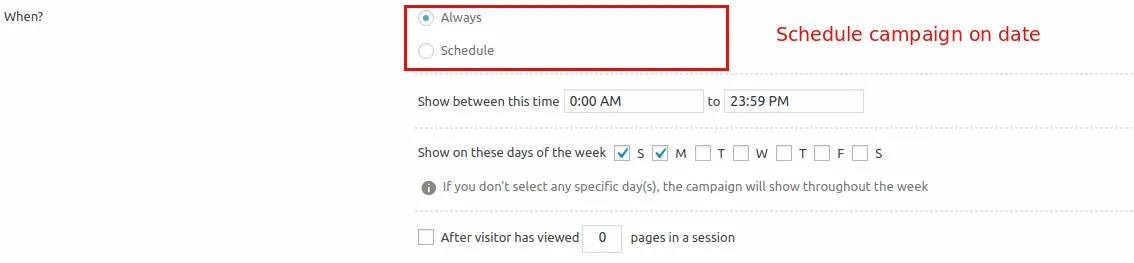
Under the scheduling options, select the Schedule radio button.
-
Select your From date and To date using the calendar pickers.
-
Save or publish your campaign.
When published, Icegram Engage will automatically display the campaign starting on the From date and deactivate it once the To date has concluded. Selecting Always keeps the campaign active continuously.
Advanced Time & Day Scheduling (Pro & Max)
With Icegram Engage Pro and Max, the When rule section expands with granular scheduling triggers:
- Time of Day: Run promotions exclusively during specific operating hours (e.g., between 9:00 AM and 5:00 PM).
- Days of the Week: Display messages only on selected days (e.g., Happy Hour weekend specials).
- Page Visit Frequency (Max): Trigger messages only after visitors have viewed a specific number of pages during their session.