

Sync User Registrations to Lists in Icegram Express
Automatically sync new WordPress user registrations to Icegram Express email lists using event-driven workflows to streamline subscriber onboarding.
With Icegram Express Workflows, you can automatically add anyone who registers on your WordPress site directly to an email list without any manual CSV exports or imports.
This works with standard WordPress registration forms, WooCommerce checkout account creation, membership plugins, or custom registration forms.
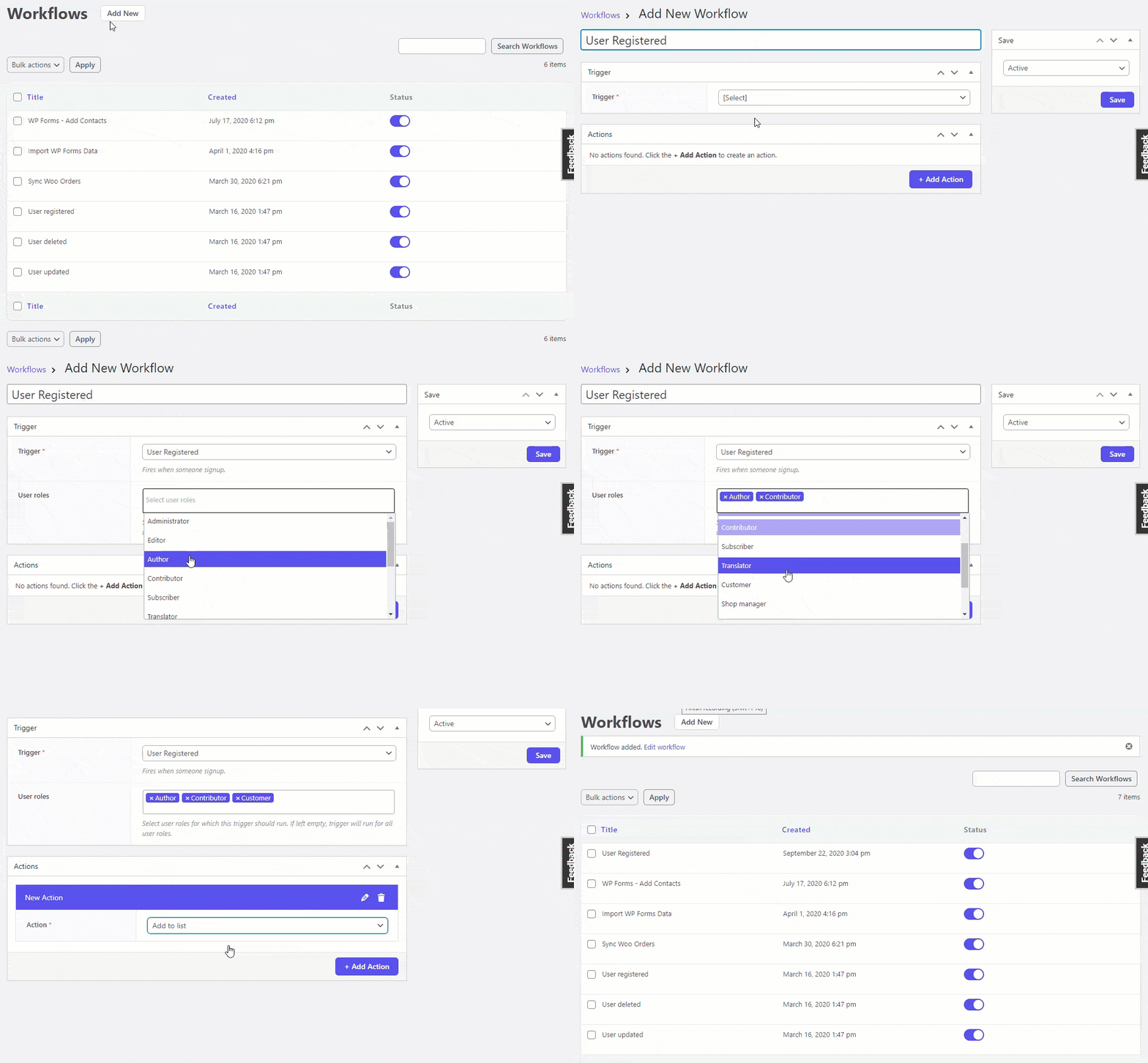
Steps to Set Up Registration Sync
- In your WordPress admin dashboard, navigate to
Icegram Express→Workflows. - Click Add New to launch the workflow builder.
- Name your workflow (e.g., Sync New User Registrations).
- Under Trigger, select
WordPress→User Registered. - Under Action, select
Icegram Express→Add to list. - Select the target list where newly registered contacts should be placed.
- Select the contact status (choose Subscribed for direct subscription, or Unconfirmed if you want them to receive a confirmation email).
- Toggle the workflow status to Active and click Save.
From this point forward, every new user account created on your site will automatically appear in your audience list.