

Send Emails Based on Open History in Icegram Express
MaxOptimize email open rates by automatically delivering campaigns at each subscriber's peak engagement time or local time zone.
Delivering newsletters when subscribers are actively checking their inbox improves open and click-through rates. Icegram Express Max includes delivery time optimization to dispatch emails at the ideal moment for each contact.
Delivery Optimization Models
Icegram Express supports two smart scheduling models:
- Subscriber Time Zone: Dispatches campaigns at a uniform local time regardless of subscriber geography. For example, scheduling a broadcast for 9:00 AM sends the email at 9:00 AM GMT to London contacts and 9:00 AM EST to New York contacts.
- Average Open Time: Analyzes each subscriber’s past open history and schedules future campaign deliveries around the specific hour the recipient historically opens your emails.
Enabling Delivery Time Optimization
Configure smart dispatch rules under plugin settings:
-
In your WordPress admin dashboard, navigate to
Icegram Express→Settings→Tracking. -
Locate the Optimize email delivery time toggle.
-
Toggle the option to active.
-
Select your preferred optimization method:
- Subscriber time zone: Delivers according to each subscriber’s detected time zone.
- Average open time: Delivers based on individual past engagement timestamps.
-
Click Save Settings.
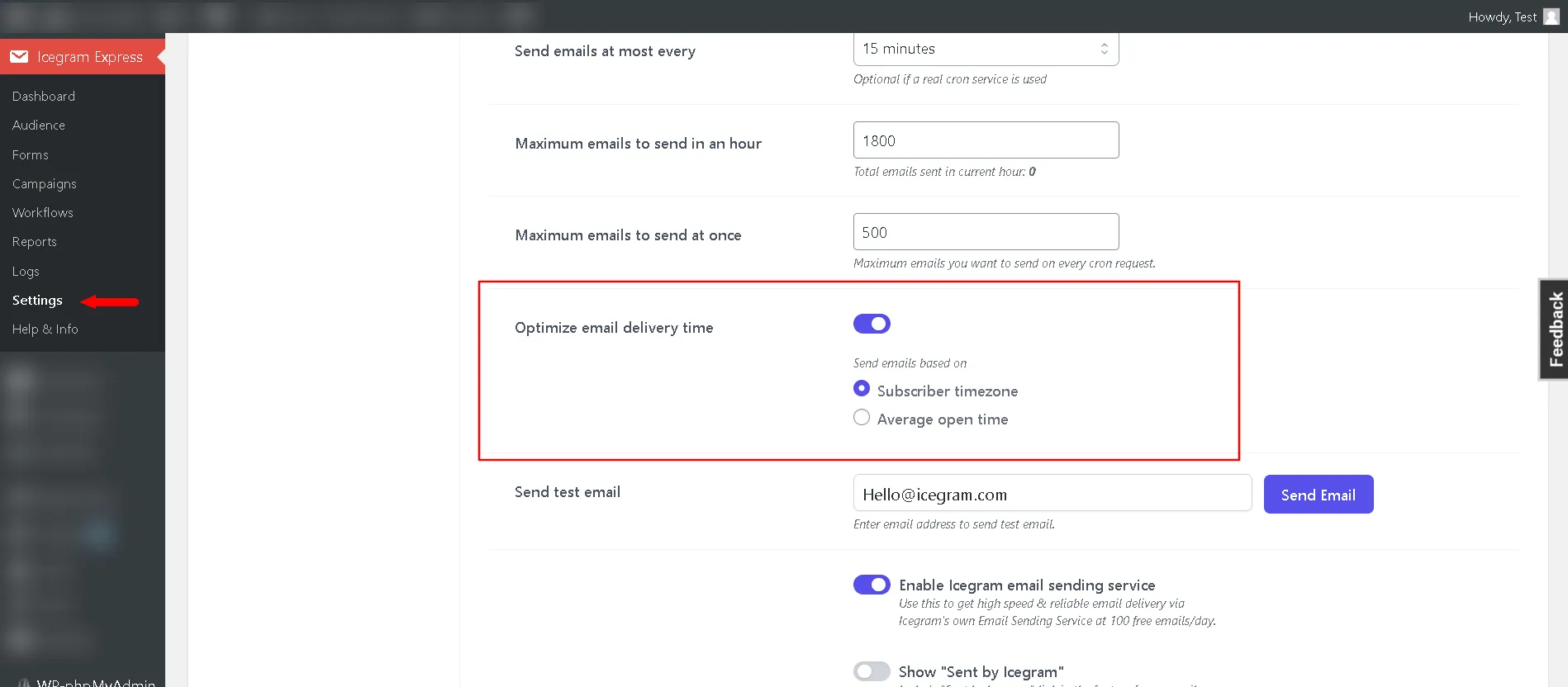
Subsequent scheduled broadcasts and post notification digests will automatically queue contacts according to their designated engagement windows.