

How to Show Icegram Engage Campaigns on Non-WordPress or Remote Sites
MaxDisplay Icegram Engage campaigns on remote non-WordPress websites (Shopify, Magento, static HTML, Joomla, etc.) using a central WordPress host and a simple JavaScript embed.
Icegram Engage Max allows you to design and manage campaigns from a central WordPress installation and display them across external websites—including non-WordPress platforms like Shopify, Magento, Webflow, static HTML sites, and other remote domains.
How Remote Campaigns Work
Your WordPress site acts as the control hub where you create messages and configure display rules. A lightweight JavaScript embed on your target website connects to the hub, loads active campaigns, and tracks interactions automatically.
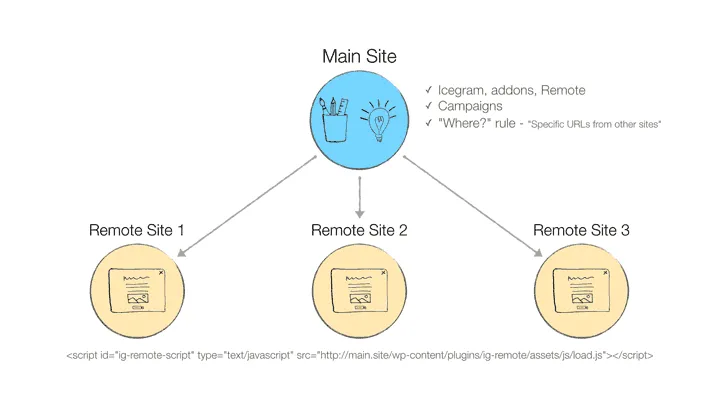
Video Walkthrough
Steps to Configure Remote Campaigns
-
Ensure Icegram Engage Max is installed and activated on your host WordPress website.
-
In your WordPress dashboard, create a new campaign or edit an existing one.
-
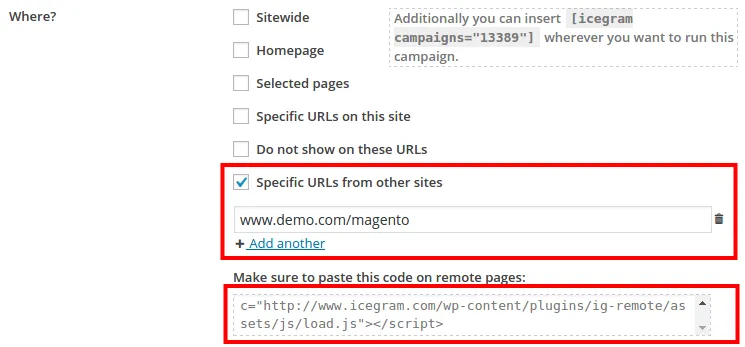
Under the Display Rules tab, navigate to the Where section and check Specific URLs from other sites.
-
Enter the URLs of the external or non-WordPress websites where you want the campaign to display. You can use wildcard patterns (e.g.,
https://example.com/store/*) to target entire sections. -
Copy the generated JavaScript embed code from the box below the URL field.
-
Paste the JavaScript code into the
<head>or before the closing</body>tag of your target non-WordPress website. -
Save your campaign in WordPress and test the live page on your external site.