

How to Show Multilingual Messages in Icegram Engage with WPML
Translate Icegram Engage popups, action bars, and other messages with WPML so visitors see them in their own language.
Icegram Engage is compatible with WPML. With the two together, you can show popups in German, action bars in Japanese, messengers in Spanish, or toast notifications in French. Any message can be shown in any language.

Prerequisites
- A WordPress site running Icegram Engage.
- The WPML Multilingual CMS plugin.
Getting started
- If you haven’t set up campaigns and messages before, follow Create your first campaign.
- If you haven’t used WPML before, read WPML’s getting started guide.
- Configure WPML’s settings the way you like.
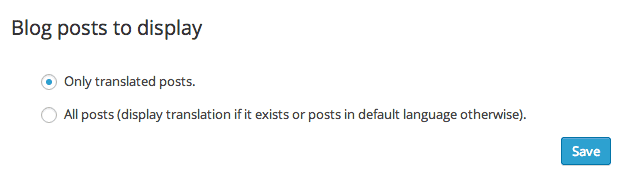
- In WPML’s language settings, find Blog posts to display. Select Only translated posts to show only local-language messages on translated pages, or All posts to show translated messages where available and fall back to the default language otherwise.
Translating messages
Icegram Engage campaigns are made up of messages. Messages hold the actual content, so messages are what you translate.
- In your WordPress admin, go to Icegram Engage > Messages.
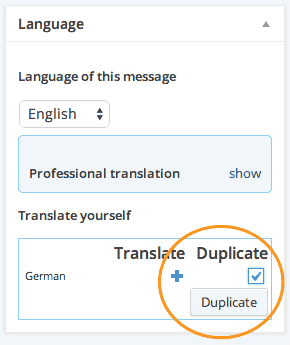
- Click the name of the message you want to localize to edit it. WPML’s translation options appear on the right of the edit screen.
- Under Duplicate, tick the languages you want the message in, then click Duplicate.
- Once duplicated, click the pencil icon to edit the message in a specific language.
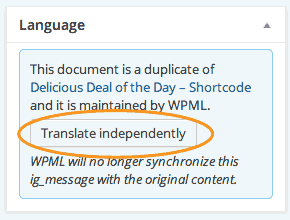
- Click Translate independently to begin translating. This stops your translation from being overwritten when the original message changes.
- Translate every message you need, yourself or with WPML’s translation tools.
Now, when someone visits a page in a non-default language, campaigns running on that page show their messages in that language.
Works with all message types
This works with every message type, built-in or add-on: popups, action bars, messengers, toast notifications, sidebars, stickies, ribbons, badges and more.
Showing messages by visitor location
To customize messages by where visitors are, or to show translated messages without WPML, use Geo Targeting. It targets campaigns to specific continents, countries, and cities, so you can run one campaign for North America and a different one for Germany. For the best results, use Geo Targeting and WPML together.