

Available Merge Tags and Keywords in Icegram Express
Complete reference guide for dynamic merge tags, personalization keywords, and post variables in Icegram Express campaigns.
Personalization merge tags (keywords) allow you to dynamically insert subscriber details, blog post data, and website metadata directly into your email subject lines and body copy.
Icegram Express uses lowercase double-curly-brace syntax: {{variable}}.
Subscriber Merge Tags
These tags are supported across all campaign types (Broadcasts, Post Notifications, and Post Digests):
| Merge Tag | Description | Example Output |
|---|---|---|
{{subscriber.name}} |
Full name of the subscriber | John Doe |
{{subscriber.first_name}} |
First name of the subscriber | John |
{{subscriber.last_name}} |
Last name of the subscriber | Doe |
{{subscriber.email}} |
Subscriber’s email address | john@example.com |
Website Merge Tags
Use these tags to dynamically reference your site details:
| Merge Tag | Description | Example Output |
|---|---|---|
{{site.name}} |
Title / name of your WordPress site | Icegram Blog |
{{site.url}} |
Full home URL of your website | https://example.com |
{{site.total_contacts}} |
Total count of registered subscribers | 1,420 |
Post Notification & Digest Merge Tags
These tags dynamically pull data from newly published posts when sending automated post notifications or weekly/monthly digests:
| Merge Tag | Description | Example Output |
|---|---|---|
{{post.title}} |
Title of the blog post | 10 Ways to Improve Email Delivery |
{{post.date}} |
Publication date of the post | September 25, 2026 |
{{post.author}} |
Author name of the post | Jane Smith |
{{post.link}} |
Clickable hyperlink with post URL | <a href="...">URL</a> |
{{post.link_with_title}} |
Clickable link with the post title as text | <a href="...">Post Title</a> |
{{post.link_only}} |
Raw plain text URL of the post | https://example.com/post-slug/ |
{{post.excerpt}} |
Post excerpt text | A quick guide to inbox delivery… |
{{post.description}} |
Short 50-character summary snippet | A quick guide… |
{{post.full}} |
Full rendered HTML content of the post | Full post body |
{{post.image}} |
Rendered <img> tag of the featured image |
<img src="..." /> |
{{post.image_url}} |
Raw URL of the featured image | https://example.com/image.jpg |
{{post.cats}} |
Categories assigned to the post | Marketing, Guides |
{{post.more_tag}} |
Post content up to the <!--more--> tag |
Post intro |
How to Insert Merge Tags in the Editor
-
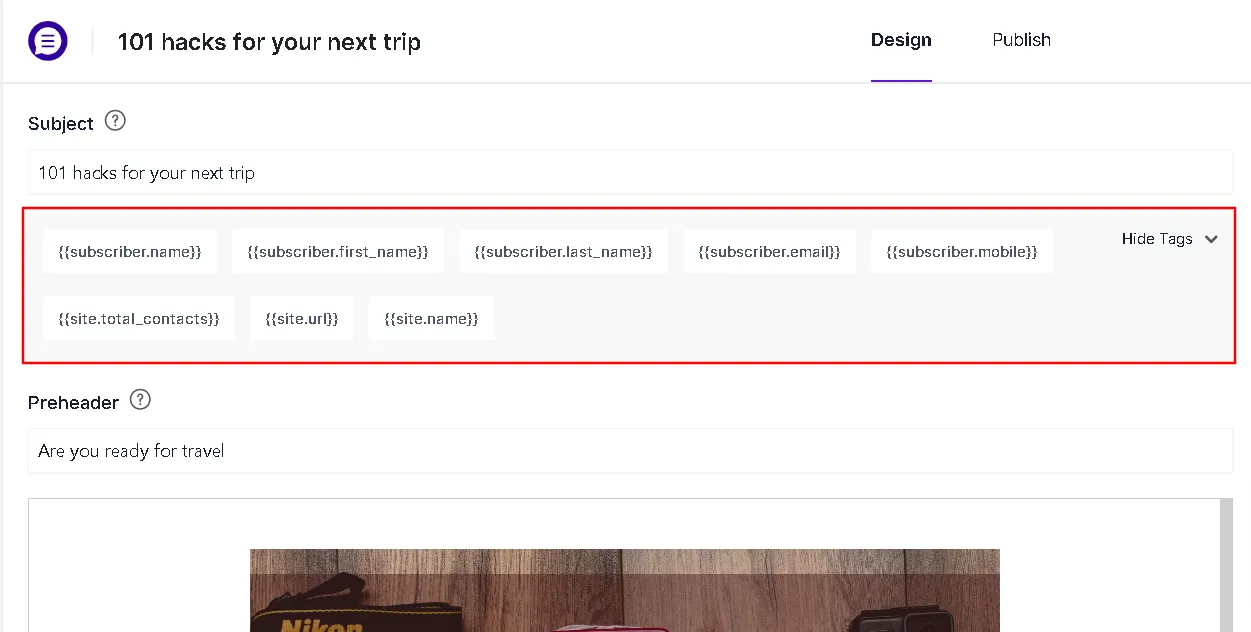
When composing an email in either the Drag & Drop editor or the Classic editor, locate the Keywords dropdown in the toolbar or sidebar.
-
Click any keyword to copy it or insert it directly at your current cursor position.
-
You can also paste merge tags directly into the email Subject line (e.g.,
Hey {{subscriber.first_name}}, check out our latest guide!).