Ultimate Member Integration with Icegram Express
MaxAutomatically subscribe approved community members and sync profile updates by integrating Ultimate Member with Icegram Express Max.
Ultimate Member is a top user profile and membership plugin for WordPress. Integrating with Icegram Express Max lets you automate member onboarding, sync member registrations to segmented email lists, and trigger role-specific drip sequences.
How to Set Up an Ultimate Member Workflow
- Ensure both Ultimate Member and Icegram Express Max are active on your site.
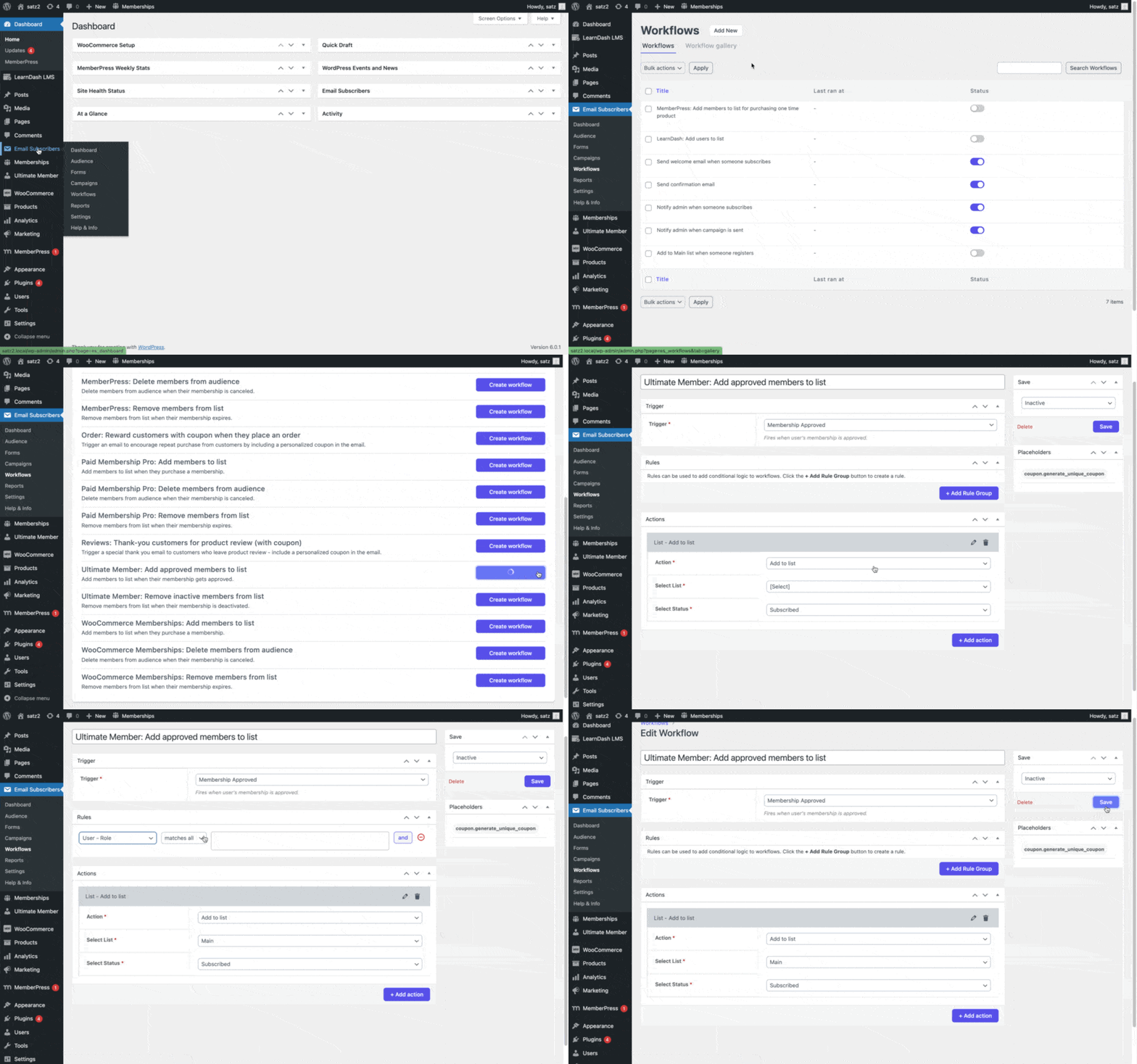
- In your WordPress admin, go to Icegram Express > Workflows > Workflow Gallery.
- Select Ultimate Member - Add approved members to list.
- In the Trigger section, choose the member event (e.g., Member Registration Approved or Role Assigned).
- In the Rules section, optionally specify which membership roles qualify.
- Under Action, choose Add to List and select the destination subscriber list.
- Set the workflow to Active and click Save.