

Email Mailers and Sending Services in Icegram Express
Connect Icegram Express to dedicated email sending services and SMTP servers for reliable, high-deliverability email transmission.
A mailer handles the actual delivery of emails from your website to your subscribers’ inboxes. By default, WordPress sends emails using its internal wp_mail() function (PHP mail), which is unauthenticated, prone to landing in spam folders, and frequently restricted by web hosts.
Connecting Icegram Express to a dedicated Email Sending Service (ESS) or SMTP provider ensures fast delivery, proper authentication (SPF, DKIM, and DMARC), and reliable deliverability.
Supported Mailers and Integrations
Icegram Express includes native integrations for leading email infrastructure providers:
- Microsoft Outlook: Connect to Microsoft 365 or Outlook via Microsoft Graph API. Available in Max plan.
- Amazon SES: High-volume, extremely cost-effective cloud email service.
- SendGrid: Popular API-based transactional and marketing email delivery.
- Mailgun: Developer-friendly email API with strong deliverability.
- Postmark: High-speed delivery with exceptional reputation monitoring.
- MailerSend: Clean, modern transactional email API by MailerLite.
- Mailjet: European-based email service provider with robust deliverability.
- Sendinblue (Brevo): Full-featured transactional email service.
- SparkPost: Enterprise email delivery engine.
- Gmail API: Connect directly to Google Workspace or personal Gmail.
- Custom SMTP: Connect any standard SMTP server or transactional relay.
How to Configure Custom SMTP
You can connect any custom mail server or transactional relay using SMTP credentials provided by your hosting company or email service.
-
Navigate to
Icegram Express→Settings→Email Sending. -
Scroll to the Mailers section and select the SMTP card.
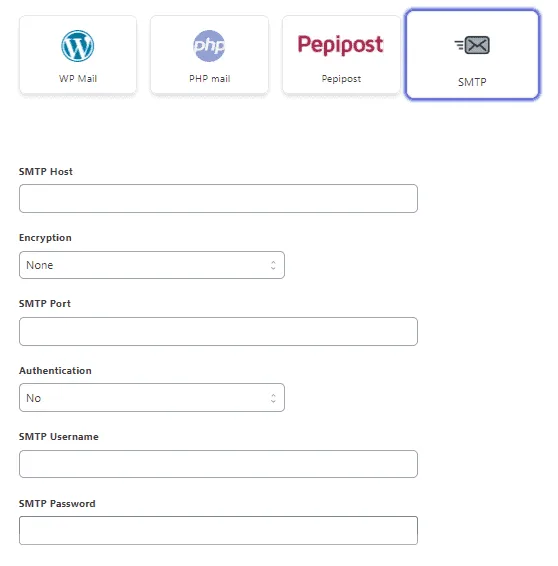
Selecting the SMTP Mailer in Icegram Express -
Enter your SMTP connection details:
- SMTP Host: (e.g.,
smtp.example.comorsmtp.sendgrid.net) - Port: Standard ports are
587(TLS) or465(SSL) - Encryption: Select
TLSorSSL - Authentication: Enable if your host requires credentials
- Username & Password: Enter your mailbox or API key credentials
- SMTP Host: (e.g.,
-
Click Save Settings.
-
Send a test email using the Send Test Email tool to verify that the connection works properly.