

Why Are My Emails Landing in the Spam Folder?
Practical strategies and domain authentication rules to prevent marketing emails from landing in customer spam or junk folders.
When emails land in spam folders, inbox providers (Gmail, Yahoo, Microsoft) have flagged the message due to sender reputation, missing DNS authentication, or spam trigger keywords.
Key Deliverability Factors to Check
1. Domain Email Authentication (SPF, DKIM, DMARC)
Modern mail providers require authenticated DNS records:
- SPF (Sender Policy Framework): A DNS TXT record listing authorized sending mail servers.
- DKIM (DomainKeys Identified Mail): Cryptographic signature verifying that email content wasn’t altered in transit.
- DMARC: Domain policy instructing inboxes how to handle failed SPF/DKIM checks. Configure these records in your DNS dashboard (Cloudflare, cPanel, GoDaddy).
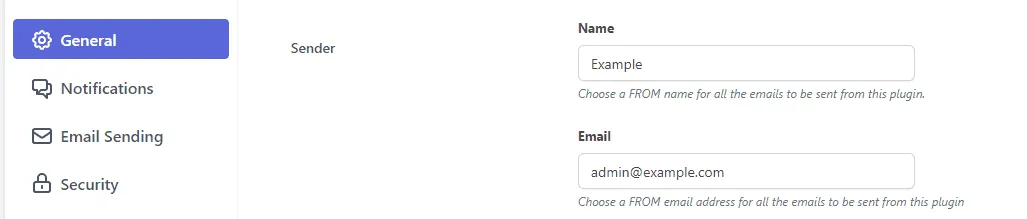
2. Match Your “From” Address to Your Domain
Sending marketing emails using a free webmail address (such as @gmail.com or @yahoo.com) violates DMARC policies. Always use a sender address matching your website’s custom domain:
3. Switch from PHP Mail to Authenticated SMTP or Cloud API
Default WordPress wp_mail() sends unauthenticated mail via PHP. Switching to an authenticated SMTP relay or API mailer (Amazon SES, SendGrid, Postmark) drastically improves inbox placement.
4. Avoid Spam Trigger Words in Subject Lines
Avoid ALL CAPS, excessive exclamation marks (!!!), and high-risk trigger phrases in subject lines (e.g., “FREE”, “URGENT”, “ACT NOW”, “CASH PRIZE”).
5. Check Content Spam Score
Use the built-in Spam Score tool before sending any broadcast to verify that your layout maintains a healthy text-to-image ratio and clean HTML markup.