


This post is about the addition of the Custom Code Block.
Achieve anything with Custom Coding

- You can increase/decrease the height of a message type.
- Change the width of the message type.
- Apply a different font to the message body.
- Change the font size of the headline.
- And lot more…
How to quickly run Custom Code In Icegram Engage
You can now add all your CSS and JS code in a separate code block. It appears right above the targeting rules section in the Icegram Engage Campaign Editing Panel.
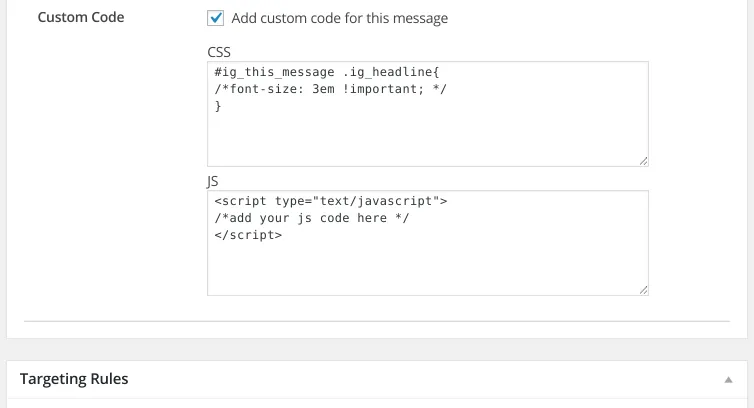
Try in under 5 minutes

Use these simple custom css codes in your next Icegram Engage campaign and have fun!
Change the width of the entire Icegram Engage message
#ig_this_message{width:30% !important;}
2. Change the font-size of the headline
#ig_this_message .ig_headline{font-size: 3em !important;}
3. Change font-family for the entire message
#ig_this_message .ig_message{font-family:“Times New Roman”, Georgia, Serif !important;}
German Translation

We have also added the German translation to Icegram Engage thanks to one of our client’s Mr. Franz for helping us with it.
Other Notable Mentions
The add-ons and docs page inside the plugin are revamped. And we hope this change will only prove beneficial. Please give it a look. Also, we’ve internally prevented the false impression count caused due to crawling. Thus Analytics will only record true impressions by real visitors and not the ones by crawlers/bots.
Alex Mielnikau
Hi,
I’m using Icegram WordPress plugin to display the Action Bar to subscribe to my blog posts. I find the hight of the Action Bar to be too big. As you explained here I can change the font-size of the headline setting it to:
#ig_this_message .ig_headline{font-size: 3em !important;}
I found even that I can change the hight of the Action Bar itself by setting this:
#ig_this_message .ig_form_container{height: 1em !important;}
But how can I change the hight of the input text field and the submit button?
Thank you!
Andrea Juliao
Hi Alex,
You can add below CSS instead of you added for headline and form container.
#ig_this_message {font-size: 0.75em !important;}You can change the font-size as per your requirement.
Thank you.
Mauricio
Hi there, I’m using Icegram in order to display a Pop Up. I’d like my users to be able to see what they are typing in this field: [email* your-email] (which comes from a form made in contact form 7) … as whatever you type in this field goes white. How can I change the color? black for example. Many thanks.
Mauro
Andrea Juliao
Hi Mauro,
It seems, your wp theme or some third party plugin is overriding the text color of email field.
Please add below css in Custom code > css area.
#ig_this_message .ig_form_container input[type="email"] { color: #000 !important }Thank you
Mike
Hi, I’m using the Action Bar. What CSS can I use to change the height of the bar? and also change the input field size for the form in the action bar? Love the plugin – thanks!!
Andrea Juliao
Hi Mike,
Thank you for using Icegram.
Can you please link where you have setup this Action bar?
We have to check first how action bar looks.
Thanks,
Team Icegram
Sofia
Hello! Im new with icegram , i’ve follow your CSS codes and its working great though I can’t seem to find out how to change the button font and place it along with the fields in the bottom of the window. Any help? Thank you!
IceDev
Hi Sofia,
Thank you for using Icegram.
Can you please give us the URL where you have set Icegram’s message?
We will check message and let you know.
You can share url on hello@icegram.com email id.
Gavin
Loving your plugin.
Is it possible for me to add a background image using custom css?
IceDev
Hi Gavin,
Yes, it is possible to add background image using custom css.
You can take a look at our Gallery in Icegram > Gallery section within the plugin, using Icegram Plus plan.
We have readymade template to use.
Hope this helps you.
Gavin Ireland
Perfect, thanks
Robin Potter
Hi,
Love the Plugin, but need help. I’m using the Solid Action Bar and would like to have the text centered. What do I add to the custom code css to make changes.
Thanx in advance…
IceDev
Hi Robin,
We recommend you to use hello theme of action bar for centre aligned content.
You can hide border by using below css and make it like Solid action bar.
#ig_this_message, #ig_this_message.ig_hello.ig_hide .ig_close{
border: none;
}
Let us know how it goes?
Matt
Hello. Love Icegram but just changed theme and now want the headline a different colour. Is there a simple code to do that please? I’ve had a go but haven’t quite succeeded.
Andrea Juliao
Hi Matt,
You can change the font color of the headline using a simple css.
<span style="color:#FE0000;">Your headline here</span>Add this code to your headline section and replace the #FE0000 with the color of your choice. If you need any help feel free to send us an email.
Regards,
Andrea.
David Schlussel
Hi – I’m using Icegram with Group Selector to help people register for a reminder on their birth month. The groups are the month names, and I’d love to have cron send the group a message at the beginning of the previous month.
I know how to set up the cron piece, but currently cron just sends all emails in the queue whenever it kicks off. I need to customize so that each time I ask the newsletter to send an email via cron, it gives me a unique message id to send. Any clues?
Mansi
Hi David,
In Email Subscribers, you cannot send emails via cron to a particular group. If you are using cron, it will send all emails in queue.
You can write your own custom code to achieve this.
Nick
Love the plugin. I was wondering if it is possible to have the action bar retain it’s properties when moving to a new page. Specifically if the bar has been minimised by the user, can it stay minimsed when a navigating to another page on the site? Is there some custom css i can add? At the moment for me it reverts to it’s original setting of being open.
Many thanks.
IceDev
Hi Nick,
Thank you for using Icegram.
Currently it is not possible to retain Action bar in minimise position.
We have design Action Bar like that, so it will reopen and noticeable on every page.
Hope this helps you.
paras bajaj
I want to change the background image of your default pop up which i selected from your gallery. How it is possible
IceDev
Please find out the image URL in the custom code > css section. Find out image URL and replace it.
Roman DeRhodes
I am using a custom Rainmaker Form with Icegram.
The email validation fails with type=”email” occasionally.
I’m intentionally testing with bad emails like “123@” or “123” or “123@abc”
I’d also like to validate a zipcode5.
I’d like to incorporate some custom code.
Do you have any examples where this is being done?
IceDev
Hi Roman,
This should not happen.
Rainmaker should validate email. As you have added some custom form you have to validate you extra fields like zip code etc.
Add script to validate zip and other fields in custom form section only.
Marc Jones
Hi Guys – can’t get a paragraph within my pop up. Apologies if this is me being awful at coding but tried all sorts of tags in the message body to no avail!
Andrea Juliao
Hey Marc,
Kindly email usthe link of your website where you have this popup setup. We can definitely have a look and help you achieve what you want.
lucy
Hi, could you please tell me how to change the text input box and button size, along with their fonts? As they are very small. I know you had previously replied to a comment stating:
#ig_this_message {font-size: 0.75em !important;}
But this isn’t working for me…the input/button and text stays the same…
Thank you
Asmi Patel
Hi Lucy,
I am really sorry for responding it too late. But I hope this helps.
You can add the below code to change the width and font-size of the fields
#ig_this_message .ig_form_container .ig_form_els input[type=”email”], #ig_this_message .ig_form_container .ig_form_els input[type=”text”], #ig_this_message .ig_form_container .ig_form_els input.ig_button{
width: 10em;
font-size : 0.75em;
}
You can target the css of the button separately #ig_this_message .ig_form_container .ig_form_els input.ig_button if you want different width for it.
Best Regards,
Asmi
Marc Hogan
I tried the code below to change the color of text for the Name field but it didn’t work. Is there override CSS code for the name field similar to email like the one below?
#ig_this_message .ig_form_container input[type=”email”] { color: #000 !important }
Asmi Patel
Hello Marc,
You can use the below code to change the color of the text for the Name field
#ig_this_message .ig_form_container input[type=”text”] { color: #fff !important; }
Hope this helps.
Best Regards,
Asmi
Ty
Hi, how do I center icegram express forms on a page?
Shubhanshu Kandani
Hi Ty,
Are you still experiencing the issue? Do you need any assistance? I apologize for missing it earlier, but we’re now looking into it as a priority.